
2020 LDAP channel binding and LDAP signing requirements for Windows (KB4520412)
Introduction
LDAP channel binding and LDAP signing provide ways to increase the security for communications between LDAP clients and Active Directory domain controllers. A set of unsafe default configurations for LDAP channel binding and LDAP signing exist on Active Directory domain controllers that let LDAP clients communicate with them without enforcing LDAP channel binding and LDAP signing. This can open Active Directory domain controllers to an elevation of privilege vulnerability.
This vulnerability could allow a man-in-the-middle attacker to successfully forward an authentication request to a Microsoft domain server which has not been configured to require channel binding, signing, or sealing on incoming connections.
Microsoft recommends administrators make the hardening changes described in ADV190023.
On March 10, 2020 we are addressing this vulnerability by providing the following options for administrators to harden the configurations for LDAP channel binding on Active Directory domain controllers:
Domain controller: LDAP server channel binding token requirements Group Policy.
Channel Binding Tokens (CBT) signing events 3039, 3040, and 3041 with event sender Microsoft-Windows-Active Directory_DomainService in the Directory Service event log.
Important: The March 10, 2020 updates, and updates in the foreseeable future, will not change LDAP signing or LDAP channel binding default policies or their registry equivalent on new or existing Active Directory domain controllers.
The LDAP signing Domain controller: LDAP server signing requirements policy already exists in all supported versions of Windows.
Why this change is needed
The security of Active Directory domain controllers can be significantly improved by configuring the server to reject Simple Authentication and Security Layer (SASL) LDAP binds that do not request signing (integrity verification) or to reject LDAP simple binds that are performed on a clear text (non-SSL/TLS-encrypted) connection. SASLs may include protocols such as the Negotiate, Kerberos, NTLM, and Digest protocols.
Unsigned network traffic is susceptible to replay attacks in which an intruder intercepts the authentication attempt and the issuance of a ticket. The intruder can reuse the ticket to impersonate the legitimate user. Additionally, unsigned network traffic is susceptible to man-in-the-middle (MiTM) attacks in which an intruder captures packets between the client and the server, changes the packets, and then forward them to the server. If this occurs on an Active Directory Domain Controller, an attacker can cause a server to make decisions that are based on forged requests from the LDAP client. LDAPS uses its own distinct network port to connect clients and servers. The default port for LDAP is port 389, but LDAPS uses port 636 and establishes SSL/TLS upon connecting with a client.
Channel binding tokens help make LDAP authentication over SSL/TLS more secure against man-in-the-middle attacks.
Microsoft Registry Settings
The mapping for LDAP Signing Policy settings and registry settings for the Domain Controllers are included as follows:
- Policy Setting: "Domain controller: LDAP server signing requirements"
- Registry Setting: LDAPServerIntegrity
- DataType: DWORD
- Registry Path: HKEY_LOCAL_MACHINE\SYSTEM\CurrentControlSet\Services\NTDS\Parameters
| Group Policy Setting | Registry Setting |
| None | 1 |
| Require Signing | 2 |
The mapping for LDAP Signing Policy settings and registry settings for Domain Clients are included as follows (Clients can be non domain controller servers and Windows 7 through Windows 11:
- Policy Setting: "Network Security: LDAP client signing requirements"
- Registry Setting: LDAPServerIntegrity
- DataType: DWORD
- Registry Path: HKEY_LOCAL_MACHINE\SYSTEM\CurrentControlSet\Services\NTDS\Parameters
| Group Policy Setting | Registry Setting |
| Not required | 0 |
| Sign if both parties are capable | 1 |
| Always sign | 2 |
The mapping between LDAP Channel Binding Policy settings and registry settings are included as follows:
- Policy Setting: "Domain controller: LDAP server channel binding token requirements"
- Registry Setting: LdapEnforceChannelBinding
- DataType: DWORD
- Registry Path: HKEY_LOCAL_MACHINE\SYSTEM\CurrentControlSet\Services\NTDS\Parameters
| Group Policy Setting | Registry Setting |
| Never | 0 |
| When Supported | 1 |
| Always | 2 |
To assist in diagnosing issues with older clients, administrators can enable LDAP Event Logging to report attempts to connect to Active Directory using potentially conflicting or non compatible LDAP signing settings.
To turn on diagnostic logging, change the registry value 16 LDAP Interface Events from 0 to 2 at HKEY_LOCAL_MACHINE \ System \ CurrentControlSet \ Services \ NTDS \ Diagnostics.
When enabled, the following additional information is recorded in the Event Log:
- Event ID 2887: A count of insecure client LDAP SASL binding attempts during the past 24 hours
- Event ID 2888: A reminder that the local server is configured to reject unsigned LDAP SASL client binding attempts (once per 24 hours)
- Event ID 2889: A warning when a client attempted an insecure LDAP binding connection
Events are recorded in the Event Viewer under Server Roles --> Active Directory Domain Services.
DOD STIG Finding
| STIG Finding |
|---|
| Finding ID: V-73629 |
| Control: Unsigned network traffic is susceptible to man-in-the-middle attacks, where an intruder captures packets between the server and the client and modifies them before forwarding them to the client. In the case of an LDAP server, this means that an attacker could cause a client to make decisions based on false records from the LDAP directory. The risk of an attacker pulling this off can be decreased by implementing strong physical security measures to protect the network infrastructure. Furthermore, implementing Internet Protocol security (IPsec) authentication header mode (AH), which performs mutual authentication and packet integrity for Internet Protocol (IP) traffic, can make all types of man-in-the-middle attacks extremely difficult. Satisfies: SRG-OS-000423-GPOS-00187, SRG-OS-000424-GPOS-00188 |
| STIG Link: https://www.stigviewer.com/stig/windows_server_2016/2019-07-09/ |
| Details: Check Text ( C-73711r1_chk ) This applies to domain controllers. It is NA for other systems. If the following registry value does not exist or is not configured as specified, this is a finding. Registry Hive: HKEY_LOCAL_MACHINE Registry Path: \SYSTEM\CurrentControlSet\Services\NTDS\Parameters\ Value Name: LDAPServerIntegrity Value Type: REG_DWORD Value: 0x00000002 (2) |
| Fix Text: (F-80079r1_fix) Configure the policy value for Computer Configuration >> Windows Settings >> Security Settings >> Local Policies >> Security Options >> "Domain controller: LDAP server signing requirements" to "Require signing". |
Configuration Through Active Directory Group Policy
AD Group Policy 1
On your Domain Controller
- Open Microsoft Management Console (mmc.exe) Select File > Add/Remove Snap-in > select Group Policy Object Editor, and then select Add.
or select the Windows icon --> Administrative Tools --> Group Policy Management
- It will open the Group Policy Management Console.
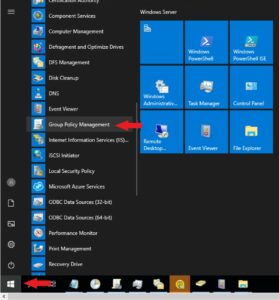
AD Group Policy 2
- We're going to build the policy out in 2 stages in order to prevent issues with client machines speaking back to the domain controllers. Right click on the Group Policy Objects folder and select New.
- Provide a name for this policy such as "YourDomain_LDAP_Signing_Clients"Click on the OK button

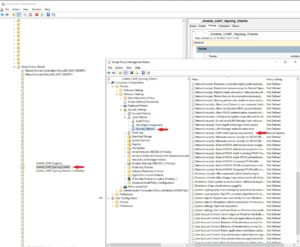
AD Group Policy 3 Clients
- Now goto the policy you created and right click and select Edit.
- Goto Computer Configuration --> Windows Settings ---> Security Settings --> Local Policies --> Security Options.
- Right-click Network Security: LDAP Client signing requirements, and then select Properties.
- Configure by selecting: Require signing in the Define this policy setting list, and then select OK.
- Recheck the settings and apply them.
AD Group Policy 4 Domain Controller
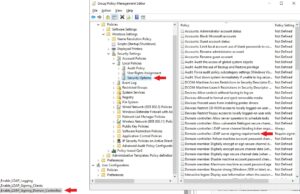
- Now goto the policy you created and right click and select Edit.
- Goto Computer Configuration --> Windows Settings ---> Security Settings --> Local Policies/Security Options.
- Right-click Domain controller: LDAP server signing requirements, and then select Properties.
- In the Domain controller: LDAP server signing requirements Properties dialog box, enable Define this policy setting, select Require signing in the Define this policy setting list, and then select OK.
- Recheck the settings and apply them.
Configuration of "Clients" With Local Group Policy
Local Server Group Policy 1
- Open Microsoft Management Console (mmc.exe) Select File > Add/Remove Snap-in > select Group Policy Object Editor, and then select Add.
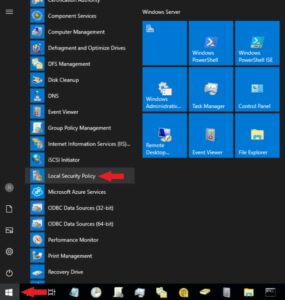
or select the Windows icon --> Administrative Tools --> Local Security Policy Management
- It will open the Local Security Policy Management Console.
Local Server Group Policy 2
This Configuration applies to "Clients" only. You can not configure the "Domain Controller" requirements through local group policy.
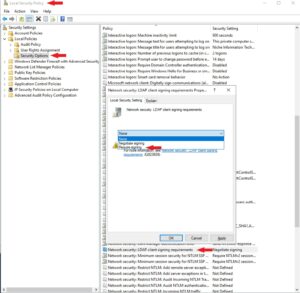
- Select Local Computer Policy > Computer Configuration > Policies > Windows Settings > Security Settings > Local Policies, and then select Security Options.
- Right-click Network security: LDAP client signing requirements, and then select Properties.
- In the Network security: LDAP client signing requirements Properties dialog box, select Require signing in the list, and then select OK.
- In the Confirm Setting Change dialog box, select Yes.
Validating Configuration Changes
- Sign in to your domain controller, got o search and enter in LDP.exe
- Select Connection (your server name) and make sure SSL for port 636 is selected–> Connect.
- select Connection > Bind.
- Under Bind type, select Simple bind.
- Type the user name and password, and then select OK.
If you receive an error message saying Ldap_simple_bind_s() failed: Strong Authentication Required, then you have successfully configured your directory server.
LDAP Binding Troubleshooting
Reference:
https://help.duo.com/s/article/3988?language=en_US
- You have Duo Authentication Proxy version 2.10.1 or earlier installed on Windows and configured for Duo Active Directory sync using Integrated or NTLMv2 authentication.
- You have Duo Authentication Proxy version 2.11.0 through 4.0.2 installed on Windows and configured for Duo Active Directory sync using NTLMv2 authentication.
- When changing your working Duo Active Directory sync configuration from LDAP/CLEAR communication between the Duo Authentication Proxy server and your domain controller(s) to LDAPS or STARTTLS you receive the error "The directory server credentials were rejected" despite supplying the correct CA certificate.
- You have the patch for CVE-2017-8563 installed on the domain controller(s) used by Duo Directory Sync, and you have followed the instructions in KB 4034879 to enable channel binding validation by setting the registry value HKEY_LOCAL_MACHINE/System/CurrentControlSet/Services/NTDS/Parameters/LdapEnforceChannelBinding to 1 (enabled) or 2 (enabled, always).
2017-09-06 18:36:16-0400 [ADClientProtocol (TLSMemoryBIOProtocol),client] C<-S LDAPMessage(id=2L, value=LDAPBindResponse(resultCode=14L, serverSaslCreds=LDAPBindResponse_serverSaslCreds(value="\xa1\x81\xfa0\x00(\x00H\x00U\x00H\x00O\x00F\*snip*\x00\x00\x00\x00")))
2017-09-06 18:36:16-0400 [ADClientProtocol (TLSMemoryBIOProtocol),client] C->S LDAPMessage(id=3, value=LDAPBindRequest(version=3, dn='', auth='*****', sasl='True'))
2017-09-06 18:36:16-0400 [ADClientProtocol (TLSMemoryBIOProtocol),client] C<-S LDAPMessage(id=3L, value=LDAPBindResponse(resultCode=49L, errorMessage='80090346: LdapErr: DSID-0C09053E, comment: AcceptSecurityContext error, data 80090346, v1db1\x00'))
2017-09-06 18:36:16-0400 [ADClientProtocol (TLSMemoryBIOProtocol),client] LDAP bind failed
Traceback (most recent call last):
File "twisted\internet\defer.pyc", line 588, in _runCallbacks
File "twisted\internet\defer.pyc", line 1184, in gotResult
File "twisted\internet\defer.pyc", line 1126, in _inlineCallbacks
File "twisted\python\failure.pyc", line 389, in throwExceptionIntoGenerator
--- <exception caught here> ---
File "duoauthproxy\modules\cloud.pyc", line 446, in do_ldap_search
File "twisted\internet\defer.pyc", line 1128, in _inlineCallbacks
File "duoauthproxy\lib\ldap\client.pyc", line 279, in perform_bind_sspi
ldaptor.protocols.ldap.ldaperrors.LDAPInvalidCredentials: invalidCredentials: 80090346: LdapErr: DSID-0C09053E, comment: AcceptSecurityContext error, data 80090346, v1db1
2017-09-06 18:36:16-0400 [-] Stopping factory <duoauthproxy.lib.ldap.client.ADClientFactory object at 0x0284FCF0>
- Upgrade your Authentication Proxy to version 5.0.0 or later. For security purposes, we always recommend updating to the most recent version of any software you use.
- Once, you have updated the proxy, use Integrated or NTLMv2 authentication for your AD sync,
Note: The registry setting for Microsoft's channel binding validation is not compatible with a configuration that includes SSL forwarding/inspection, proxied traffic, or a load balancer between the Authentication Proxy and the Domain Controller, nor when the Authentication Proxy installed on a non-Windows server or a Windows server not joined to the authenticating domain, nor when the Duo AD sync is using NTLMv1 authentication.
If you are already running Authentication Proxy 2.11.0 through 4.0.2, and cannot update to Authentication Proxy 5.0.0, configure your AD sync to use Integrated authentication.
TTENTION: before you continue reading I must emphasize that the MARCH 2020 update and FUTURE UPDATES *****WILL NOT MAKE ANY CHANGE*****. This means that we leave it to Customer to decide when to enforce these settings, now and in the future.
Our recommendation is to enforce both of them and not leave your environment at risk
Another important article that I suggest to read:
LDAP session security settings and requirements after ADV190023 is installed
I have to point out that at first these changes were scheduled to become active with upcoming March 2020 update, but some improvements were made and now March 2020 update will only add some new functionalities and make no changes, giving Customers the opportunity to choose.
Let’s start saying that since Windows Server 2008 we have Event IDs related to unsigned LDAP binds like 2886, 2887, 2888 and 2889 if you enable auditing which will detail IP Address and Account that made the request
Also the new March 2020 update will add support for new Event IDs related to LDAP Channel Bindings. After you install the update you will have 3040 and 3041 triggered every 24 hours by default and 3039 if you enable auditing which will detail IP Address and Account that made the request (CBT is used only in rare cases: LDAP session security settings and requirements after ADV190023 - Windows Server | Microsoft Docs)
This information is preliminary and is subject to revision.
This article is a living document, written over time and is subject to change. When guidance presented in this article is in direct conflict with official documentation, one must defer to official documentation.
This is the link to the public Security Advisory
ADV190023 | Microsoft Guidance for Enabling LDAP Channel Binding and LDAP Signing: https://portal.msrc.microsoft.com/en-us/security-guidance/advisory/ADV190023
This is the link to the public KB:
March 2020 update links:
Windows 10 v1903 and Windows 10 v1909: 4540673
Windows 10 v1809: 4538461
Windows 10 v1803: 4540689
Windows 10 v1709: 4540681
Windows Server 2019: 4538461
Windows Server 2016: 4540670
Windows Server v1903 and Windows Server v1909: 4540673
Windows Server v1803: 4540689
Windows 8.1 and Windows Server 2012 R2 Monthly Rollup: 4541509
Windows 8.1 and Windows Server 2012 R2 Security Only: 4541505
Windows Server 2012 Monthly Rollup: 4541510
Windows Server 2012 Security Only: 4540694
NEW AUDITING capabilities coming with March 2020 update:
March 2020 update will add new Auditing capabilities into group policies related to LDAP Channel Binding and LDAP Signing (this one has been around for a while)
- Through new Group Policy setting you can configure LDAP Channel Binding and LDAP Signing "auditing"
NOTE: Auditing can also be enabled via Registry, on each Domain Controller
Reg Add HKLM\SYSTEM\CurrentControlSet\Services\NTDS\Diagnostics /v "16 LDAP Interface Events" /t REG_DWORD /d 2
Once you have configured auditing, the system will start logging the following Event IDs (Directory services log):
For LDAP Signing
Event ID 2889 (needs auditing enabled)
Triggered when a client does not use signing after authentication on sessions on the LDAP port.
***Event 2889 will be triggered when there is no encryption and the client making the bind request does not support LDAP Channel Binding. In all bind requests using SSL/TLS, the LDAP channel binding token is required; if it is not provided, the request will be rejected.
his is the Event ID you want to check to understand which IP Addresses and Accounts are making these requests.
Once you open Event ID 2889 in Details you will have
Client IP address: “Value”
Identity the client attempted to authenticate as: “Value”
| 2889 | The security of these domain controllers can be improved by configuring them to reject simple LDAP bind requests and other bind requests that do not include LDAP signing. | Triggered when a client does not use signing for binds on sessions on port 389. Minimum Logging Level: 2 or higher |
You will also find these other events related to LDAP (by default with no auditing enabled):
2886 (already on by default and logged every 24 hours)
Telling us that our DCs are not requiring LDAP signing
2887 (already on by default and logged every 24 hours)
Telling us how many such binds occurred
The suggested path to resolve this error is do modify the registry of the DC to allow it log those failures.
2888 (already on by default and logged every 24 hours)
If the directory server is configured to reject unsigned SASL LDAP binds or LDAP simple binds over a non-SSL/TLS connection, the directory server will log a summary event 2888 one time every 24 hours when such bind attempts occur.
The mapping between LDAP Signing Policy settings and registry settings are included as follows:
- Policy Setting: "Domain controller: LDAP server signing requirements"
- Registry Setting: LDAPServerIntegrity
- DataType: DWORD
- Registry Path: HKEY_LOCAL_MACHINE\SYSTEM\CurrentControlSet\Services\NTDS\Parameters
| Group Policy Setting | Registry Setting |
| None | 1 |
| Require Signing | 2 |
For LDAP Channel Binding
Event ID 3039 (needs Auditing enabled)
Triggered when a client attempts to bind without valid CBT
This is the Event ID you want to check in order to understand which IP Addresses and Accounts are making these requests.
***Triggered only on “When Supported” and “Always” when a client fails to bind due to invalid CBT
You will also find these other events related to LDAP (by default with no auditing enabled):
3040 Triggered every 24 hours by default when CBT group policy is set to "Never" and at least one unprotected bind was completed
3041 Triggered every 24 hours by default on startup or start of service if the CBT group policy is set to "Never"
The mapping between LDAP Channel Binding Policy settings and registry settings are included as follows:
- Policy Setting: "Domain controller: LDAP server channel binding token requirements"
- Registry Setting: LdapEnforceChannelBinding
- DataType: DWORD
- Registry Path: HKEY_LOCAL_MACHINE\SYSTEM\CurrentControlSet\Services\NTDS\Parameters
| Group Policy Setting | Registry Setting |
| Never | 0 |
| When Supported | 1 |
| Always | 2 |
Recommended ACTIONS
For IT Adminstrators we recommend to Enable Auditing and fix issues in order to enable both of these enforcements
Support for LDAP Signing is common among non-Windows OS versions
Support for LDAP Channel Binding is rare among non-Windows operating systems.
- Find out which Appliances / Services are making these requests and try to find out if they support LDAP Signing and LDAP Channel Binding. Ask each specific "vendor" for detailed information and guidelines
- Find out which Non-Windows OSs and which Applications running on them are making these requests. Check if they support and can be configured with LDAP Signing and/or LDAP Channel Binding
- Find out which Windows OSs and which Applications running on them are making these requests.
- All versions of Windows after XP support LDAP signing.
Windows XP does NOT support LDAP channel binding and would fail when LDAP channel binding is configured with a value of “always” but would remain interoperable with DCs configured with more relaxed LDAP channel binding setting of “when supported”.
- Configure recommended values for Signing and CBT
- LDAPServerIntegrity = 2
- LdapEnforceChannelBinding = 1
NOTE: Once you fix all the unsecure connections from Applications/Applicances/Devices/OSs we suggest to enforce these settings to ensure your environment is secured
Enable LDAP Signing and LDAP Channel Binding
LDAPServerIntegrity = 2
LdapEnforceChannelBinding = 2
DETAILED Information about these settings
The concept of channel binding allows applications to establish that the two end-points of a secure channel at one network layer are the same as at a higher layer by binding authentication at the higher
layer to the channel at the lower layer. https://tools.ietf.org/html/rfc5929 and https://tools.ietf.org/html/rfc5056
LDAP Channel Binding
March 2020 update will add the following:
- Adds support for a new LDAP Channel Binding policy "Domain Controller: LDAP server channel binding token requirements"
- Adds support for 3039, 3040, 3041 events logged in the Directory Service event log to identify LDAP binds that don't use CBT
- Allows LDAP Signing and Channel Binding to be independently "relaxed" or "hardened" at any time
- DOES NOT modify the policy setting or the registry equivalent for “Domain controller: LDAP server channel binding token requirements” in any way
Very important NOTE: You need to have this CVE-2017-8563 installed on your clients as a prerequisite before enabling LDAP Channel Binding and LDAP Integrity on DCs
ADV190023 | Microsoft Guidance for Enabling LDAP Channel Binding and LDAP Signing: https://portal.msrc.microsoft.com/en-us/security-guidance/advisory/ADV190023
CVE-2017-8563 | Windows Elevation of Privilege Vulnerability (REQUIRED):
An elevation of privilege vulnerability exists in Microsoft Windows when a man-in-the-middle attacker is able to successfully forward an authentication request to a Windows LDAP server, such as a system running Active Directory Domain Services (AD DS) or Active Directory Lightweight Directory Services (AD LDS), which has been configured to require signing or sealing on incoming connections.
The update addresses this vulnerability by incorporating support for Extended Protection for Authentication security feature, which allows the LDAP server to detect and block such forwarded authentication requests once enabled.
Main thing to point out is that March 2020 update WILL NOT make any change nor any future update.
For LDAP Channel Binding we recommend configure the most compatible setting which equals to the following:
- LDAP Channel Binding = 1
AD - HKEY_LOCAL_MACHINE\System\CurrentControlSet\Services\NTDS\Parameters
ADLDS - HKEY_LOCAL_MACHINE\SYSTEM\CurrentControlSet\Services\<LDS instance name>\Parameters
value: 1 = indicates "enabled, when supported". All clients that are running on a version of Windows that has been updated to support channel binding tokens (CBT) must provide channel binding information to the server. Clients that are running a version of Windows that has not been updated to support CBT do not have to do so. This is an intermediate option that allows for application compatibility.
Possible CBT values:
- DWORD value: 0 indicates disabled. No channel binding validation is performed. This is the behavior of all servers that have not been updated.
- DWORD value: 1 indicates enabled, when supported. All clients that are running on a version of Windows that has been updated to support channel binding tokens (CBT) must provide channel binding information to the server. Clients that are running a version of Windows that has not been updated to support CBT do not have to do so. This is an intermediate option that allows for application compatibility.
- DWORD value: 2 indicates enabled, always. All clients must provide channel binding information. The server rejects authentication requests from clients that do not do so.
Important Notes
- Before you enable this setting on a Domain Controller, clients must install the security update that is described in CVE-2017-8563. Otherwise, compatibility issues may arise, and LDAP authentication requests over SSL/TLS that previously worked may no longer work. By default, this setting is disabled.
- The LdapEnforceChannelBindings registry entry must be explicitly created.
- LDAP server responds dynamically to changes to this registry entry. Therefore, you do not have to restart the computer after you apply the registry change.
LDAP Channel Binding: To maximize compatibility with older operating system versions (Windows Server 2008 and earlier versions), we recommend that you enable this setting with a value of 1.
To explicitly disable the setting, set the LdapEnforceChannelBinding entry to 0 (zero).
Windows Server 2008 and older systems require that Microsoft Security Advisory 973811, available in “KB 968389 Extended Protection for Authentication”, be installed before installing CVE-2017-8563.
If you install CVE-2017-8563 without KB 968389 on a Domain controller or AD LDS instance, all LDAPS connections will fail with LDAP error 81 - LDAP_SERVER_DOWN. In addition, we strongly recommended that you also review and install the fixes documented in the Known Issues section of KB 968389.
LDAP Signing
- LDAP Server Integrity (signing) = (March 2020 update will NOT change this setting)
https://support.microsoft.com/en-us/help/935834/how-to-enable-ldap-signing-in-windows-server-2008
I want to note that this article shows two sections related to server and client, which need to be configured:
- How to set the server LDAP signing requirement
- How to set the client LDAP signing requirement through a domain Group Policy Object
If we want to force these settings you should configure these settings :
- Enable LdapEnforceChannelBinding = 1 (must have CVE-2017-8563)
- Enable LDAP Server Signing
- DCs = policy "Domain controller: LDAP server signing requirements" = Require Signing
- Servers/Clients = policy "Network security: LDAP client signing requirements = Require Signing
Summarizing
Summarizing this long article we can state the following:
- AUDIT - Directory Services Log is our friend, find out which machine/account is making these unsecure connections:
- Event IDs 2889 for LDAP Signing
- Event IDs 3039 for LDAP Channel Binging
- AUDIT - Appliances/Devices/Applications: find out if they support Signing and Channel Binding
- Fix issues and Enforce these settings through GPO "manually"
- On Clients/Servers we need to have as a prerequisite CVE-2017-8563 “Extended Protection for Authentication” before we enable LDAP CBT and LDAP Signing
- March update will not make any change to signing or channel binding
Clients whom are attempting conenctions that are not meeting the requirements to the domain controller leveraging an insecure connection protocol will generate Event ID 2889. The log entries will contain the IP addresses of the end points whom are not configure properly to meet the LDAP requirements. Administrators can enable this by setting the 16 LDAP Interface Events diagnostic setting to 2 (Basic). Learn how to configure AD and LDS diagnostic event logging here at Microsoft.
New-ItemProperty -Path ‘HKLM:\SYSTEM\CurrentControlSet\Services\NTDS\Diagnostics’ -Name “16 LDAP Interface Events” -Value 2 -PropertyType DWORD -Force
Error:
Internal event: The LDAP server returned an error.
Additional Data
Error value:
0000208D: NameErr: DSID-03100238, problem 2001 (NO_OBJECT), data 0, best match of:
'CN=DC2,CN=Servers,CN=2-Office,CN=Sites,CN=Configuration,DC=LocalDomain,DC=local'
Explanation:
This LDAP warning as well as 1216, 1317, 1535 should be not an issue. These event messages occur when a client sends a request to the Domain Controller by using User Datagram Protocol (UDP), but does not keep its socket open to listen for the response from the server. When the server attempts to send the answer back, the error message is logged to the event log. This event is harmless that can occur frequently under normal operating conditions. It occurs only if the diagnostic logging level is increased by modifying the level of LDAP logging to 2 or above in the following registry key:
[HKLM\SYSTEM\CurrentControlSet\Services\NTDS\Diagnostics]
16 LDAP Interface Events
Remediation:
Recommended to set it to 1 or 0 as a test. As the issue only occurs on a specific server, administrators can also check the registry key other servers for validation.